


KOCO 5 News and Weather
4.6940.00 Reviews
App Specs
- Version
- Varies with Device
- Updated On
- License
- Free
- Downloads
- 100,000+
- Developer
- HTVMA Solutions, Inc.
- Categories
- News & Magazines
- Platform
- Android
Screenshots
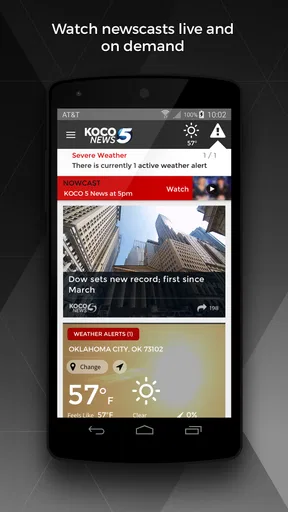
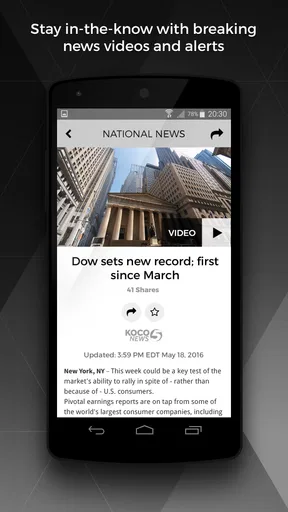
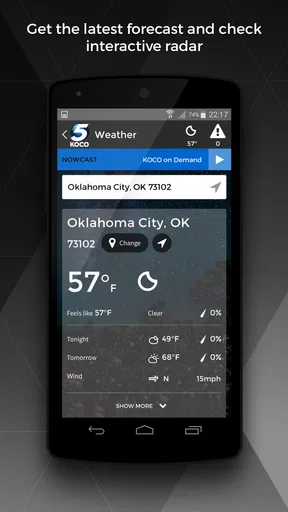
 Analysis by AppCompare
When I need local information quickly, I usually want two things in the same place: a clear update on what is happening nearby and a weather check that helps me decide what to do next. KOCO 5 News and Weather is built around that simple need. It is a free news and magazines app from HTVMA Solutions, Inc., focused on breaking, local, and weather coverage from KOCO 5 News. After spending time with it, I found it most useful as a practical local-news companion rather than a complete replacement for every source I use.
The app has a straightforward purpose, and that focus is one of its strongest qualities. Instead of asking me to search through a broad national news service and then filter down to local stories, it puts the local angle first. That makes a difference during a busy morning, before leaving home, or when I want to understand whether a developing event affects my area. Its audience is clearly people who care about local Oklahoma coverage and want quick access from a phone.
From a quick check to a useful local update
I find the app’s value clearest when I treat a quick glance as the start of a decision, not the whole answer. In this section, I look at how local headlines and weather checks can fit into a real routine, and where I would slow down to get more context before acting. That balance sets up a closer look at what happens when I use it repeatedly throughout a busy day.
Starting with the situation that matters
My typical starting point is not “I want to read the news.” It is more specific: I want to know whether traffic, severe weather, a public event, or a developing local story will change my plans. That is where this app makes sense. I can open it with a question in mind and move toward an answer without first sorting through unrelated international headlines.
The app belongs to the News & Magazines category, but its local identity is more important than the category label. KOCO 5 News gives it a recognizable editorial focus, and the app’s role is to bring that coverage into a mobile workflow. I would recommend it first to residents who already follow the station or who want a local source alongside a broader news app.
It is also approachable for casual users. The content rating is Everyone, and the app is free, so there is little commitment involved in trying it. The current audience signal is encouraging: it holds a 4.6 average from around 4.2 thousand ratings, with more than 900 written reviews and over 100 thousand installs. Those figures do not make the app perfect, but they suggest that many people find the basic local-news experience worthwhile.
Step one: scan before deciding what deserves attention
My first move is to scan the main news presentation rather than open the first headline automatically. This is a useful habit with any local-news app because the most visible story is not always the one that affects my day. A quick scan helps separate urgent developments from routine coverage and gives me a sense of what the newsroom considers important at that moment.
Worth Reading Before You Choose

EA SPORTS FC Mobile 26 Is a Bigger Football Game, but It Takes Time

Flipboard Shows What News Apps Must Do Beyond the Feed

Switching to Android Auto Means Rethinking Your Driving Routine

Google Calendar Makes a Crowded Week Easier to Manage

Ludo King Makes the Most of the Minutes Between Plans

Baby Panda World Brings Quick Play to Modern Phones, but Its Game Library Feels Busy
KOCO 5 News and Weather works best when I treat it as a decision tool. I am not opening it only for entertainment or endless reading. I am checking whether a story requires a change of route, a change of timing, or simply a few minutes of attention. That mindset keeps the experience efficient and prevents the app from becoming another feed I scroll through without remembering anything.
A useful tip is to read the headline together with its local context. A weather-related story, for example, may be more useful when considered alongside the current conditions and the rest of the day’s outlook. A breaking-news headline may need a second look before I make a strong assumption about what is happening. The app helps me reach the information quickly, but I still need to read carefully rather than react to a short title.
Step two: move from headline to weather decision
The weather side becomes especially valuable when it follows a news check. If I see a local weather update, I can use it to answer a practical question: should I leave earlier, carry rain gear, change an outdoor plan, or pay closer attention to later updates? That handoff from news to weather is the app’s most natural workflow because both types of information support the same everyday decision.
For example, imagine I am preparing for a morning commute and notice a local report that could affect roads or public activity. I would read the story first, then check the weather information before choosing when to leave. If conditions look unsettled, I would avoid relying on a single glance and return later for another check. The app is useful in that scenario because it keeps the local story and the weather context close together.
This is also where I see an important trade-off. A dedicated weather app may offer a deeper set of forecasting tools, while a broad news app may provide more national and international context. KOCO 5 News and Weather is stronger when I want local reporting and weather in one familiar place. It is less compelling if my only goal is advanced forecasting or a wide-ranging news digest.
Step three: decide whether to keep following the story
Local news changes quickly, so the first article I read is not always the end of the workflow. If the subject affects my commute, family, work, or neighborhood, I need to decide whether it deserves another check later. I found that the app is best used in short visits: open it, identify what matters, read enough to understand the situation, and return when the situation is likely to develop.
That approach is more realistic than expecting one visit to provide a final answer. Breaking coverage can evolve, and weather conditions can shift. I would not use any single update as permission to ignore changing circumstances. Instead, I use the app as a local checkpoint, particularly when a developing story has a direct effect on my plans.
Another practical insight is to separate information gathering from action. First, I use the app to understand what KOCO 5 News is reporting. Then I compare that information with what I can see around me, official instructions when relevant, and the needs of the people involved. This matters during serious weather or public-safety situations, where a news app can inform a decision but should not be treated as the only authority.
The handoff between phone, home, and daily plans
The most useful handoff is from the app to whatever I do next. A weather check may lead me to adjust clothing or travel time. A local story may prompt me to warn someone about a disruption or look for a more direct update. The value is not just in reading; it is in reducing the time between noticing something and responding sensibly.
I can also imagine a household workflow where one person checks the app before work and passes the important detail to everyone else. In that situation, concise reading matters. I would avoid forwarding a headline without understanding the article because a short title may not explain the location, timing, or scope of an event. The app supports quick sharing of awareness in a broad sense, but the responsibility for communicating accurately still rests with the user.
For someone who follows local television news already, the app can be a convenient second screen. It lets that person check coverage without waiting for a scheduled broadcast. For someone who never watches local news, it offers a more direct way to sample the same local focus through a phone. In both cases, the handoff is simple: the app supplies the update, and the user decides whether it changes anything offline.
What the workflow produces
At its best, the result is not a large archive of articles. It is a better-informed next step. I can leave home with a clearer idea of the local situation, decide whether a weather concern deserves attention, and return later if the story remains relevant. That modest outcome is exactly why the app works for me. It does not need to replace every other source to be useful.
The app’s age also gives it some context. It was released on May 15, 2012, so it has been part of the mobile-news landscape for a long time. I would not interpret that release date as proof that every part of the experience feels modern, but it does show that this is an established local-news app rather than a new experiment. The developer, HTVMA Solutions, Inc., has positioned it around a specific station and audience instead of trying to become a universal news platform.
I also appreciate that the basic cost barrier is low. Since it is free, I can test whether its local coverage fits my needs without buying a subscription first. That makes it easy to keep alongside another weather or news tool. The real question is not whether it can do everything, but whether its local focus earns a place in my daily routine.
Where the flow becomes less comfortable
The first limitation is scope. If I want a broad national briefing, deep international reporting, long-form analysis, or a large range of specialized topics, this is not the app I would choose first. Its strength comes from being local, and that naturally means it cannot serve every kind of news reader equally well.
The second limitation is that local coverage is most valuable when the user is connected to the area it serves. Someone moving between regions, traveling frequently, or living far from the station’s audience may open the app less often. In that case, a national news service or a general weather app may provide more consistent value.
The third issue is workflow friction caused by relying on quick checks. A short visit can tell me what appears important, but it may not answer every follow-up question. I may still need to read the full report, look for later developments, or consult a more direct source before acting. That is not a failure unique to this app, but it is an important boundary: speed and local relevance do not automatically equal complete context.
I would also skip it if I expect a highly customizable weather workstation. People who plan activities around detailed forecasting may prefer a dedicated weather product designed around specialized maps, measurements, or long-range planning. KOCO 5 News and Weather makes more sense for someone who wants weather as part of a local information routine, not as the entire purpose of the phone.
Who should install it and who should pass
I think it is a good fit for local residents who want a fast way to check KOCO 5 News coverage and weather before making everyday decisions. It is particularly suitable for people who prefer a station-centered source over a crowded national feed. The free price and Everyone rating also make it easy to try in a household without much setup anxiety.
I would recommend it less strongly to readers who already have a trusted local-news workflow and need something the app does not emphasize, such as extensive national reporting or advanced weather analysis. Installing another app only makes sense if its local focus saves time or improves awareness. If it simply duplicates a service I already use, the extra icon may add clutter rather than value.
My practical advice is to test it at the moments when local information matters most: before commuting, before an outdoor plan, and during a developing local story. Those situations reveal its usefulness faster than casual browsing. Pay attention to whether the local focus helps you reach a decision, and whether you are comfortable returning for updates instead of expecting one visit to settle everything.
My final take
KOCO 5 News and Weather succeeds by staying close to a real need: checking local news and weather in the same routine. I like it as a focused companion for quick awareness, especially when a local story may affect travel, schedules, or plans. It feels more purposeful than a general feed when I care about what is happening nearby.
At the same time, I would not present it as a universal news or forecasting solution. Its local emphasis is a benefit for the right audience and a limitation for everyone else. I would pair it with a broader news source if I wanted wider context, and with a dedicated weather tool if I needed more specialized forecasting.
For an Oklahoma-focused reader who values quick local checks, the app is easy to justify. It is free, established, and well regarded by its existing audience, while its most useful feature is really the workflow it enables: notice a local development, check the weather context, decide what changes, and return when the situation develops. That is a practical role, and in my experience, it fills it well.
Pros
- Live local news updates keep you informed throughout the day.
- Weather forecasts include radar views and severe weather alerts.
- Video reports make important stories easy to follow.
- Breaking-news notifications can arrive quickly during emergencies.
- Coverage focuses on Oklahoma City and nearby communities.
Cons
- Some news videos may load slowly on weaker connections.
- Frequent notifications can feel excessive for some users.
- Advertising may interrupt browsing or video viewing.
- Forecast accuracy can vary during rapidly changing weather.
- Some features may require location access to work properly.
FAQs for KOCO 5 News and Weather
What is KOCO 5 News and Weather?
KOCO 5 News and Weather is a local news and weather app focused on Oklahoma City and surrounding communities. It provides access to breaking news, local reporting, video coverage, weather forecasts, radar maps, severe-weather alerts, and live updates from KOCO 5. It is designed for users who want convenient regional information on an Android or iOS device.
What weather features are available in the KOCO 5 app?
The app typically includes current conditions, hourly and extended forecasts, interactive radar, satellite imagery, and severe-weather information for locations in the KOCO viewing area. Users can usually save multiple locations and receive notifications for important weather developments. Forecast accuracy and available features may vary by location, device settings, and the app version installed.
Can I watch live news or access video content in KOCO 5 News and Weather?
Yes, the app offers video content such as local news reports, weather updates, interviews, and coverage of developing stories. Depending on your location, programming schedule, and station availability, it may also provide live streaming or live event coverage. Some streams can be restricted to the KOCO 5 service area, and an internet connection is required for video playback.
Does KOCO 5 News and Weather send breaking-news and weather alerts?
The application can send push notifications about breaking local news, severe storms, tornado warnings, watches, and other important developments. During setup, you can generally choose whether to allow notifications and may be able to adjust alert categories later. For safety, keep your phone’s notification permissions enabled, but always use official emergency services and weather radios for critical warnings.
Is KOCO 5 News and Weather free to download and use?
KOCO 5 News and Weather is generally available as a free download, allowing users to read news, view forecasts, and access selected videos without purchasing the app. However, it may contain advertising, and certain live streams or content can depend on location, licensing, or station availability. Mobile-data charges may also apply when using video, radar, or live updates away from Wi-Fi.


